

Imagine you've just spent thousands of dollars on a new website.
It looks fantastic.
The photography is beautiful. The logo sits perfectly in the header. Everything slides smoothly into place.
Then somebody asks:
"Has the website been optimised for search?"
Silence.
This happens more often than you might expect.
A website can be beautifully designed without being particularly easy for Google to understand.
That's where on-page SEO for small business comes in.
And despite the terminology, it doesn't need to be mysterious.
On-page SEO is largely about making each important page clear: what it's about, which service it represents, how it relates to the rest of the website and whether it gives people the information they actually need.
Here are the parts I'd pay attention to first.
Start with one simple question
Open one of your service pages.
Pretend you've never seen the business before.
Now ask:
What is this page actually about?
Can you answer within five seconds?
If the page is about commercial cleaning in Melbourne, that should become apparent fairly quickly.
If the main heading says:
Creating Cleaner Possibilities
you've certainly created something inspirational.
You haven't necessarily explained what you sell.
Something like:
Commercial Cleaning Services in Melbourne
is considerably less mysterious.
Clear language helps customers.
It also gives search engines useful context.
Good SEO and good communication frequently want the same thing.
The page title matters
Every important webpage should have a title.
Not simply the large heading people see on the page, but the HTML title search engines can use when interpreting and displaying it.
A page title such as:
Services | Smith & Co
doesn't tell us much.
If the page specifically concerns bookkeeping for Melbourne small businesses, something closer to:
Small Business Bookkeeping Melbourne | Smith & Co
provides considerably more information.
That doesn't mean cramming keywords into titles.
A title should describe the page accurately.
Think of it like the label on a filing cabinet.
If every drawer says "Information", you've technically labelled them.
You just haven't made the labels particularly useful.
Your main heading should describe the page
The primary heading — commonly called the H1 — helps establish the subject.
Again, clarity wins.
A builder might be tempted to use:
Building Your Dreams
as the main heading.
It's nice advertising copy.
But:
Home Extension Builders in Melbourne
immediately tells a visitor what the page offers.
You can still use creative language elsewhere.
SEO doesn't require stripping personality from a website.
It simply means important information shouldn't be hidden behind advertising language.
Don't obsess over putting the keyword everywhere
This is where on-page SEO used to become ridiculous.
You'd see paragraphs like:
"Our Melbourne plumbers provide Melbourne plumbing services to customers looking for plumbers in Melbourne. Contact our Melbourne plumbers for Melbourne plumbing."
Nobody talks like that.
And nobody wants to read it.
Once you've done sensible keyword research, use the language naturally.
If you're discussing commercial cleaning, you'll probably mention offices, cleaners, workplaces, cleaning schedules, facilities, hygiene and related concepts without consciously trying to satisfy a formula.
That's context.
You don't need one exact phrase repeated 37 times.
Give the service enough explanation
One of the most common weaknesses on small-business websites is the tiny service page.
It might contain:
Bathroom Renovations
We provide quality bathroom renovations tailored to your needs. Contact us today.
That's it.
Put yourself in the customer's position.
What have you actually learned?
Not much.
A useful service page could explain:
- what the service includes;
- the types of projects undertaken;
- who the service is suitable for;
- how the process works;
- areas serviced;
- common questions;
- relevant experience;
- examples of previous work;
- how someone can enquire.
The objective isn't to make the page artificially long.
It's to make it genuinely informative.
That's a recurring theme in small business SEO.
Don't hide everything inside images
Sometimes designers create beautiful graphics containing important words.
There's a problem.
Text embedded inside an image isn't the same as ordinary webpage text.
Important information such as service descriptions, locations and headings should generally exist as actual page content.
Use images to support the information.
Don't make them carry the entire conversation.
The same applies to PDF brochures.
If the only detailed explanation of your services exists inside a downloadable brochure, your actual service page may still be remarkably thin.
URLs don't need to be complicated
Which address tells you more?
example.com/page?id=4927
or:
example.com/commercial-cleaning
The second is considerably easier for a person to understand.
URLs don't need to contain every possible keyword.
Keep them descriptive and relatively simple.
And don't casually change established URLs simply because you've discovered a prettier version.
If an existing page already has rankings or backlinks, changing its address without proper redirects can create unnecessary problems.
Internal links help build the map
Suppose you have a page about roof restoration.
You've also published an article explaining:
How to Know When a Tile Roof Needs Restoring
Those pages belong together.
Link them.
This is internal linking.
It helps visitors move through related information and helps search engines understand how pages connect.
Your most important pages shouldn't be buried in a corner of the website with almost nothing linking to them.
If a service is commercially important, relevant content elsewhere on the site should naturally support it.
This is also why useful business content can become valuable over time.
Each article can strengthen the broader information structure rather than existing as an isolated blog post.
Images still need some attention
Huge images can slow a page unnecessarily.
Meaningless filenames don't help organisation.
Missing alternative text can make images less accessible.
You don't need to become an image-optimisation specialist.
Just follow some sensible practices:
Compress unnecessarily large files.
Use appropriate dimensions.
Give files meaningful names where practical.
Add descriptive alt text when the image communicates useful information.
And don't stuff keywords into every alt tag.
Alt text exists primarily to describe the image.
Treat it that way.
Your mobile version is not optional
Small-business owners often build websites on desktop computers.
Customers don't necessarily view them that way.
Take your phone out.
Open the website.
Try to perform the actions you want a customer to perform.
Can you navigate?
Can you read the text?
Can you tap the buttons?
Can you find the contact information?
Can you complete the enquiry form?
Does anything overlap?
Does something enormous cover half the screen?
Does the site feel painfully slow?
This is one of those situations where SEO and customer experience overlap again.
Fixing mobile problems isn't merely about Google.
It's about not irritating potential customers.
Don't forget the boring pages
Most businesses naturally focus on the homepage.
But Google doesn't only rank homepages.
Individual service pages can be enormously important.
Look at:
Homepage
Service pages
Location pages
About page
Contact page
Important articles
Each page has a job.
The homepage introduces the business.
A service page explains a service.
An article answers a question.
The contact page makes communication easy.
A strong website gives those pages distinct purposes rather than forcing everything onto the homepage.
Local businesses need location context
If you're a Melbourne business, make that reasonably clear.
This doesn't mean adding "Melbourne" to every sentence.
It means ensuring the website accurately communicates where the business operates.
For example:
Where are you based?
Which areas do you serve?
Do customers visit you?
Do you travel to them?
Does your contact information match your other online business information?
These details support Local SEO and make the website more useful to customers.
Someone shouldn't have to reach the checkout or enquiry form before discovering you're 900 kilometres away.
Trust belongs on the page too
SEO conversations can become so focused on keywords that we forget a human has to trust the business.
Useful trust signals may include:
customer reviews;
professional accreditations;
relevant licences;
case studies;
real project photographs;
years of experience;
clear business information;
realistic guarantees where appropriate;
transparent processes;
contact details.
Which ones matter depends on the business.
A customer's trust requirements when choosing a café are rather different from choosing someone to rewire their house.
The website should reflect that.
What about AI search?
This is another reason clear pages matter.
An AI system attempting to understand your business may need to establish:
What does this company actually do?
Where does it operate?
Who does it serve?
What does each service involve?
What evidence supports the business's expertise?
Vague marketing language makes those questions harder to answer.
Clear service pages make them easier.
Nobody can guarantee inclusion in AI-generated recommendations.
But a website containing well-organised, explicit and useful information creates a much clearer representation of the business.
That's beneficial whether the reader is Google, an AI system or a person.
What should you fix first?
If you have a small website and limited budget, don't try to optimise 100 things simultaneously.
Start with your most commercially important pages.
For each one, check:
Is the page targeting the right search?
Does the title accurately describe it?
Is the main heading clear?
Does the page properly explain the service?
Is the location obvious where relevant?
Are useful internal links pointing to it?
Does it work properly on mobile?
Does it give people enough reason to trust the business?
That alone can reveal a surprising amount.
Then work outward.
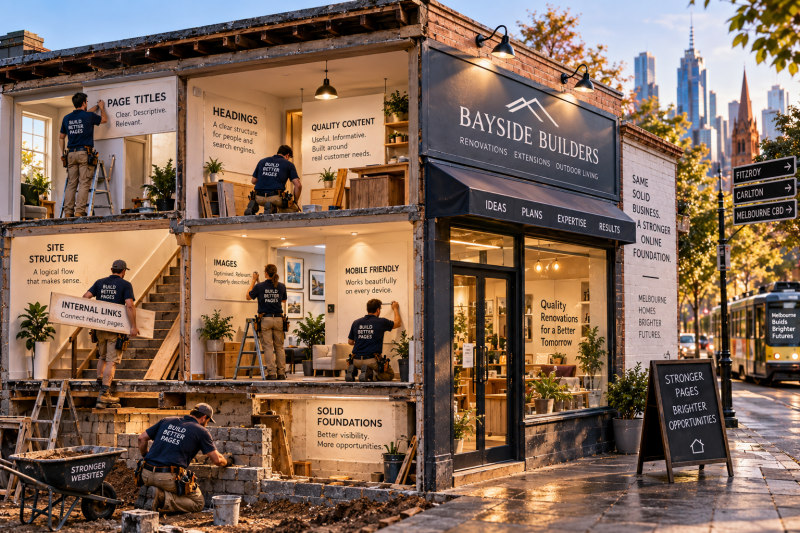
On-page SEO is the foundation, not an optional extra
This is important.
Businesses sometimes jump straight to backlinks, content campaigns or ongoing SEO while the underlying website hasn't been properly optimised.
That's backwards.
If Google can't clearly understand your important pages, building authority around them becomes considerably harder.
It's why LabRank Digital treats on-page SEO as an essential foundation for businesses wanting to improve organic visibility.
Our one-off on-page packages are $249 for websites with up to five pages and $399 for websites with up to 15 pages.
The objective isn't to turn every webpage into something that screams "SEO."
Quite the opposite.
Good optimisation should make a page feel clearer, more useful and better organised.
The best on-page SEO often doesn't look like SEO
That's probably the easiest way to recognise it.
The heading makes sense.
The service is properly explained.
The page has a logical structure.
Related information is connected.
The location is clear.
The website works on a phone.
The title describes what's there.
Questions are answered.
Customers can work out what to do next.
Nothing feels forced.
No keyword appears every second sentence.
You simply have a better webpage.
And that's the part of on-page SEO for small business that sometimes gets lost amongst technical terminology.
You're not optimising a collection of words for a machine.
You're making it easier for people and search systems to understand what your business has to offer.
Get that foundation right, and everything you do afterwards has something stronger to build upon.
Add comment
Comments