

Google Business Profile Optimisation: Start With the Basics
Here's a slightly uncomfortable question for a small-business owner:
When did you last look at your own Google Business Profile?
Not your website.
Not your Facebook page.
Your actual business listing on Google.
If the answer is "I think I set it up a few years ago," you're certainly not alone.
For some businesses, that little listing may be seen by prospective customers far more frequently than their beautifully designed homepage.
And yet it can contain photographs from 2019, Christmas trading hours from three years ago and a phone number belonging to someone who hasn't worked there since Scott Morrison was Prime Minister.
So today we're not going to talk about complicated SEO.
We're going to do something more useful.
We're going to give your Google Business Profile a check-up.
Start by pretending you don't own the business
This is surprisingly effective.
Search for your business on Google as though you've never heard of it.
Don't immediately log into anything and start editing.
Just look.
What does a potential customer see?
Can they quickly establish:
What do you do?
Where are you?
When are you open?
How do they contact you?
Do you appear trustworthy?
Can they see what you actually provide?
If any of those answers require detective work, you've already found something worth improving.
Check the boring information first
Business owners naturally gravitate toward photographs, descriptions and reviews.
But start with the boring stuff.
Because boring information can lose real customers.
Check your:
Business name
Address
Phone number
Website
Opening hours
Business category
Service area
If Google says you close at 5:00 pm but you actually close at 3:00 pm on Fridays, that's not merely an SEO problem.
Someone may drive across Melbourne at 4:15 and discover a locked door.
They probably won't admire your keyword strategy.
Don't stuff keywords into your business name
Suppose the business is called:
Smith & Sons Plumbing
Don't turn the Google listing into:
Smith & Sons Plumbing | Best Emergency Plumber Melbourne Cheap Plumbing Hot Water Experts
Your business name should represent your real-world business name.
Trying to transform it into a miniature advertisement makes the listing look less trustworthy and isn't a sensible long-term strategy.
Put information where it belongs.
Your services belong in your services.
Your description belongs in your description.
Your business name belongs in your business name.
Simple.
Have you chosen the right category?
Categories help Google understand what kind of business you operate.
That makes them surprisingly important.
Suppose you run a physiotherapy clinic.
If your primary category doesn't accurately reflect that, you're making Google's job unnecessarily difficult.
Choose the most accurate primary category available.
Then add appropriate secondary categories where they genuinely describe services you provide.
The key word there is genuinely.
Don't select every vaguely related category because more must surely be better.
A plumber isn't automatically also a bathroom shop, construction company, appliance repair service, interior designer and swimming-pool contractor.
Clarity beats ambition.
Now look at your description
This is where small businesses sometimes disappear into corporate language.
You know the sort:
"We deliver innovative, customer-centric solutions through our commitment to excellence and unparalleled service."
Excellent.
But what do you actually do?
A useful business description should help a normal person understand the business.
Consider something more concrete:
"We're a family-run electrical business based in Preston, providing residential electrical repairs, switchboard upgrades, lighting installation and electrical safety work across Melbourne's northern suburbs."
It's not trying to win a literary award.
It tells people what the business does and where it operates.
That's useful.
List the services you actually want enquiries for
Imagine you're an electrician who wants more switchboard work.
But your profile simply says:
Electrician
You're making customers work harder to understand whether you provide the service they need.
Where appropriate, complete the services section with the actual services the business provides.
The same applies across industries.
An accountant might provide:
tax returns;
BAS preparation;
bookkeeping;
small-business accounting;
company setup.
A beauty salon might provide:
facials;
waxing;
brow treatments;
skin treatments.
A builder might provide:
renovations;
extensions;
bathroom renovations;
kitchen renovations.
Again, this isn't an invitation to stuff keywords everywhere.
It's about describing the business accurately.
Your photos shouldn't look abandoned
Now open your photographs.
What do they say about the business?
If the newest photograph was taken before COVID, consider updating things.
Depending on the business, useful photographs might show:
your premises;
your team;
completed projects;
products;
equipment;
the entrance;
interior;
before-and-after work.
Real photographs can be particularly powerful for local businesses.
If I'm considering a landscaper, I'd rather see gardens they've actually landscaped than a generic stock photograph of a mansion in Los Angeles.
The same principle applies to builders, hairdressers, restaurants, mechanics, dentists, retailers and countless other businesses.
Show people the business they're considering dealing with.
Reviews deserve a process
Last time we discussed local SEO for small business, I mentioned that reviews shouldn't be treated as an occasional panic exercise.
They're worth revisiting because your Google Business Profile is where many customers will encounter them.
Don't wait until a competitor reaches 250 reviews and then decide you need 200 by Friday.
Instead, build requesting reviews into your ordinary customer process.
If a job has been completed successfully, make it easy for the customer to leave honest feedback.
You don't need to tell them what to write.
You don't need to offer rewards for glowing reviews.
You don't need to recruit Aunt Margaret, three cousins and the bloke next door.
Real customer feedback is the objective.
Respond to reviews like a human
Businesses sometimes respond to every positive review with exactly the same sentence:
"Thank you for your valued feedback. We appreciate your business."
Again.
And again.
And again.
You can do better than that.
If somebody has taken the time to mention something specific, acknowledge it naturally.
If a customer says:
"Thanks to Michael for getting our hot water working again so quickly."
A perfectly reasonable response might be:
"Thanks, Sarah. Glad Michael could get it sorted quickly for you. We really appreciate the review."
Nothing revolutionary.
It just sounds like an actual business talking to an actual customer.
What about negative reviews?
Don't start a war.
Even if the reviewer is infuriating.
Your response isn't only being read by the person who complained.
Future customers are reading it too.
A calm response can demonstrate that you take concerns seriously.
Where appropriate, acknowledge the issue and offer to continue the discussion privately.
And if the review is clearly fake or violates Google's policies, use the available reporting process rather than turning the review section into an episode of Jerry Springer.
Make sure the website agrees with the profile
Here's something else to check.
Your Google Business Profile says:
Open Saturday
Your website says:
Closed Saturday
Your profile says:
03 9000 1234
Your website says:
03 9000 5678
Your profile says:
Richmond
Your website still shows your old Hawthorn address.
Which one should Google trust?
More importantly, which one should the customer trust?
Your online presence should tell a coherent story.
This is one of the connections between Google Business Profile optimisation, on-page SEO and broader local search work.
Individual pieces shouldn't contradict each other.
Check where the website button goes
Click it.
Seriously.
Businesses change websites, rebuild pages and alter domains.
Sometimes nobody notices that an old profile is still sending prospective customers to a dead page.
Check that:
the page loads;
it's secure;
it works properly on a phone;
the contact details are current;
the visitor can quickly understand the business.
Getting somebody to click through from Google is only half the job.
The website then has to do something useful with them.
Don't overlook special hours
Public holidays are particularly important.
If you're closed on Melbourne Cup Day, Christmas Day or another holiday but Google says you're open, customers may rely on that information.
Likewise, if you're open when competitors aren't, accurate special hours can be useful.
Your profile isn't something to configure once and forget forever.
Businesses change.
The information should change with them.
This doesn't mean you should fiddle with it every day
There's a difference between maintaining something and obsessing over it.
You don't need to wake up every morning thinking:
"What can I change in my Google profile today?"
If the information is correct, leave it alone.
Update things when there's something useful to update.
Add genuine new photographs.
Adjust changed hours.
Add legitimate services.
Respond to customer feedback.
Think of it like maintaining the sign outside your shop.
You wouldn't repaint it every Tuesday just to demonstrate activity.
You'd make sure it remains accurate, useful and presentable.
What does this have to do with AI search?
Quite a lot conceptually.
People increasingly search conversationally.
Instead of:
"accountant Melbourne"
someone might ask:
"Find me a small-business accountant in Melbourne's inner north who works with sole traders."
For an AI system to identify suitable businesses, it needs information.
What does the business do?
Where is it?
What services does it provide?
What information exists about it elsewhere?
What do customers say about it?
A properly maintained local presence contributes to that broader pool of information.
That doesn't mean completing your Google Business Profile guarantees inclusion in AI-generated recommendations.
It doesn't.
But making your business easier for digital systems to understand is considerably more sensible than leaving contradictory or incomplete information scattered around the internet.
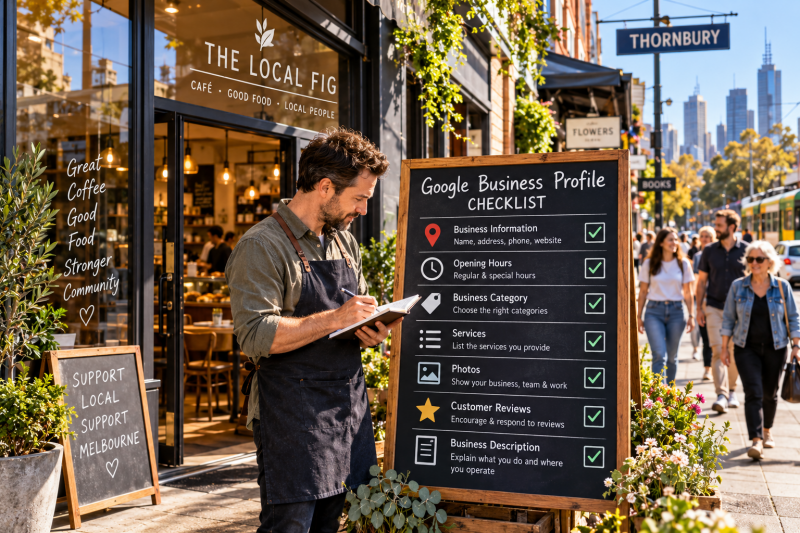
A 15-minute Google Business Profile check
If you only have 15 minutes today, check these:
- Is your business name correct?
- Is your primary category accurate?
- Are your phone number and website correct?
- Are your normal and special opening hours accurate?
- Is your address or service area correct?
- Are your main services represented?
- Do you have recent, genuine photographs?
- Have recent customer reviews received appropriate responses?
- Does your website contain the same core business information?
You may discover everything is fine.
Great.
Or you may discover that Google thinks you close at 2:00 pm, your website link is broken and your primary photograph is a blurry shot of a car park from 2018.
Also useful to know.
Sometimes local SEO starts with housekeeping
SEO has developed a reputation for being mysterious.
Algorithms.
Backlinks.
Schema.
Authority.
Artificial intelligence.
Technical audits.
All of those subjects have their place.
But sometimes the most sensible thing a small business can do is much less glamorous:
Make sure Google has accurate information about the business.
That's a major part of what Google Business Profile optimisation is about.
At LabRank Digital, our Local SEO service is $399 one-off per location and includes Google Business Profile optimisation plus placement in five appropriate directories.
But whether you do it yourself or get somebody else to handle it, the principle remains the same.
Don't try to trick Google into believing your business is more relevant than it is.
Help Google—and potential customers—understand the business that already exists.
For a local small business, that's a much better place to start.
Add comment
Comments